
The My Apps section is where you can see the amount you pay per app and add or remove streaming apps depending on if you are still subscribed to them or not. You can also update the amount you’re paying for your subscriptions to easily track your streaming expenses!
Please note that MyBundle may automatically add apps to your "My Apps" section if you click through to the site to subscribe. At times this may save apps that you ultimately did not subscribe to - we do not currently have a way of knowing for sure which apps you are subscribed to.
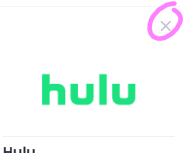
If you see an app in your My Apps section that you are not subscribed to, you can remove it by selecting the small "x" in the top right of that app's logo, as shown in the screenshot below: